 EveryRig™
One app. Every game.
Tuned for your rig.
 Veteran-owned and developed · Designed and built by simulator enthusiasts
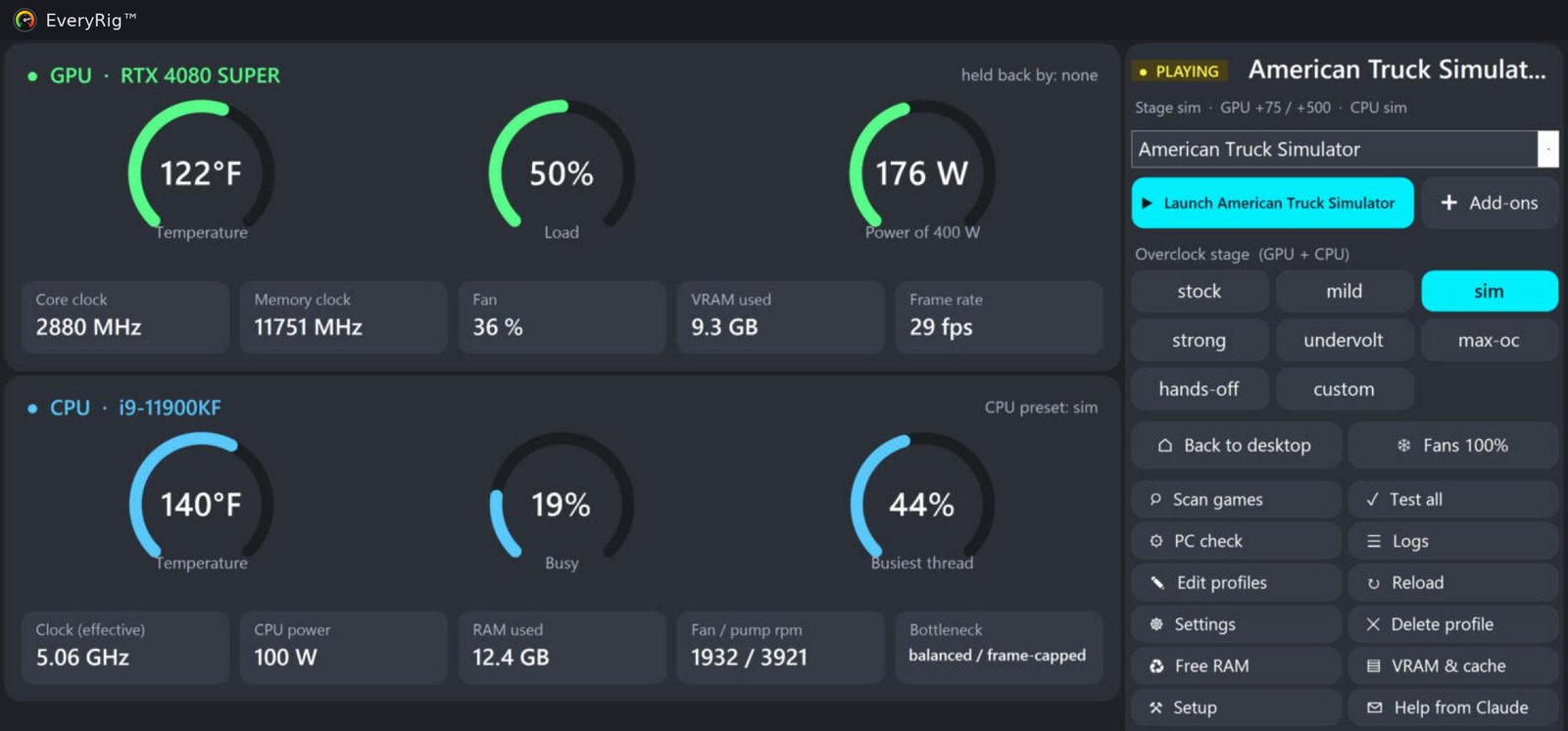
EveryRig™ is the all-in-one, AI-assisted tuner. It scans your hardware, builds a GPU + CPU tune for your exact machine, switches it on the moment each game starts, and watches temperatures, clocks and frame rates while you play. Click Help from Claude and the AI reviews your results and each game’s own settings files, then tells you exactly which tune and in-game settings to change.
All in one simple tray app: overclocking, CPU tuning, monitoring, frame-rate stats and PC health checks. Nothing installed into Windows — it runs from its own folder, with no services or background bloat, uses barely any CPU, and puts everything back to stock when you quit.
Version 2.5.8 · 14-day free trial with everything on · then $19.95 one-time · no account, no subscription
AMD Ryzen 5000 / 7000 / 9000 owner? Test Ryzen tuning and get EveryRig™ Pro free — your copy is yours to keep.
What it does
A tune for every game
Stages from stock to max, sized by a setup wizard for your exact GPU and CPU. Each game keeps its own, applied the moment it starts.
Safety first
Backs off when the GPU runs hot, lowers a game's tune after a driver crash, and goes to safe mode after an unexpected reboot. Always back to stock on exit.
Real frame numbers
Live fps, 1% lows and stutter spikes (Intel PresentMon), plus a report after every session with what held the game back.
PC check
Finds what costs more than any overclock: a monitor stuck at 60 Hz, XMP off, an old driver, a full drive, background hogs, a slow network link.
Made for VR and sims
VR hotkeys with voice in the headset, OpenXR runtime switching, Virtual Desktop network checks, and add-ons (TeamSpeak, map tools, mods) that start with the game.
Help from Claude
One click saves your hardware, logs and each game's settings file. Upload it to Claude and get fixes matched to what's really holding your games back.
Made for people who want more from their PC
Flight sim pilots
Microsoft Flight Simulator 2024 and 2020, DCS World, X-Plane and Prepar3D. The sim stage keeps the CPU at full boost for heavy airports and big scenery, where most stutter comes from.
Sim racers and truckers
iRacing, Assetto Corsa, ACC, Le Mans Ultimate, rFactor 2, BeamNG, American and Euro Truck Simulator. Steady frame times and quieter fans for long stints.
VR players
Quest 3 with Virtual Desktop or Link, SteamVR and OpenXR. Hotkeys that work with the headset on, voice confirmation in your ears, and warnings when a slow network link or a VPN would hurt the stream.
Every other PC gamer
Tired of setting MSI Afterburner profiles, NVIDIA or AMD software and Intel XTU by hand for each game? EveryRig™ does it automatically and puts everything back to stock when you quit.
Works with
Graphics
NVIDIA GeForce RTX 20 to 50 and GTX 16, AMD Radeon RX 6000 / 7000 / 9000. Full list below.
CPU
Intel Core 10th to 14th gen through Intel XTU (free from Intel). AMD Ryzen tuning: in development coming soon as a free update. Test it and get EveryRig™ Pro free. Full list below.
Games
Anything on Windows. Finds Steam, Epic, Microsoft Store / Xbox, GOG, Meta and DCS games by itself.
Graphics cards it tunes
| Series | Cards | What it tunes |
|---|---|---|
| NVIDIA RTX 50 | RTX 5090, 5080, 5070 Ti, 5070, 5060 Ti, 5060, 5050 | Core and memory clocks, power limit, undervolt (clock cap), fan control, frame cap |
| NVIDIA RTX 40 | RTX 4090, 4080 SUPER, 4080, 4070 Ti SUPER, 4070 Ti, 4070 SUPER, 4070, 4060 Ti, 4060 | |
| NVIDIA RTX 30 | RTX 3090 Ti, 3090, 3080 Ti, 3080, 3070 Ti, 3070, 3060 Ti, 3060, 3050 | |
| NVIDIA RTX 20 / GTX 16 | RTX 2080 Ti, 2080 SUPER, 2080, 2070 SUPER, 2070, 2060 SUPER, 2060; GTX 1660 Ti, 1660 SUPER, 1660, 1650 SUPER, 1650 | |
| NVIDIA GTX 10 | GTX 1080 Ti, 1080, 1070 Ti, 1070, 1060 | Power limit and fans; clock changes partly (some cards ignore them — EveryRig™ checks and tells you) |
| AMD Radeon RX 9000 | RX 9070 XT, 9070, 9060 XT | Clock, memory, voltage (undervolt), power limit, fan curve |
| AMD Radeon RX 7000 | RX 7900 XTX, 7900 XT, 7900 GRE, 7800 XT, 7700 XT, 7600 XT, 7600 | |
| AMD Radeon RX 6000 | RX 6950 XT, 6900 XT, 6800 XT, 6800, 6750 XT, 6700 XT, 6650 XT, 6600 XT, 6600, 6500 XT | |
| AMD Radeon RX 5000 and older | Power limit and fans only. | |
| Intel Arc | Not tuned — CPU tuning still works on a supported Intel CPU. | |
NVIDIA cards are tuned through NVIDIA's own driver interface, AMD cards through AMD's official tuning interface in the Adrenalin driver - keep your graphics driver up to date. Laptop versions of these cards work too, but many laptops lock fan control and power limits. Frame caps are NVIDIA only (AMD: use Radeon Chill).
CPUs it tunes
| Generation | Full tuning: undervolt, power limits, boost (unlocked K / KF / KS) | Power limits only (locked) |
|---|---|---|
| Intel Core 10th gen | i9‑10900K / KF, i9‑10850K, i7‑10700K / KF, i5‑10600K / KF | other 10th-gen Core i5 / i7 / i9 |
| Intel Core 11th gen | i9‑11900K / KF, i7‑11700K / KF, i5‑11600K / KF | other 11th-gen Core i5 / i7 / i9 |
| Intel Core 12th gen | i9‑12900K / KF / KS, i7‑12700K / KF, i5‑12600K / KF | other 12th-gen Core i5 / i7 / i9 |
| Intel Core 13th gen * | i9‑13900K / KF / KS, i7‑13700K / KF, i5‑13600K / KF | other 13th-gen Core i5 / i7 / i9 |
| Intel Core 14th gen * | i9‑14900K / KF / KS, i7‑14700K / KF, i5‑14600K / KF | other 14th-gen Core i5 / i7 / i9 |
| AMD Ryzen | In development — coming soon Ryzen CPU tuning is being built now and will arrive as a free update. Until then EveryRig™ shows Ryzen temperature and power and sets power plans, and AMD Radeon graphics cards are already fully tuned. Have a Ryzen 5000, 7000 or 9000 desktop? Test it and get EveryRig™ Pro free — yours to keep. | |
| Intel Core Ultra 200S, older than 10th gen | Not tuned yet — monitoring and power plans only. | |
* 13th / 14th gen get extra safety rules: never any added voltage and no all-core overclock. Make sure your BIOS has Intel's latest microcode. CPU tuning needs Intel XTU 7.x installed; EveryRig™ tells you if it's missing. Graphics cards are tuned on every supported CPU.
Everything included
- ✓ Dashboard, gauges and live tray temperatures
- ✓ Setup wizard that sizes every stage for your exact hardware
- ✓ Automatic tune for every game, applied the moment it starts
- ✓ Every stage: stock, mild, sim, strong, undervolt, max-oc, hands-off, custom
- ✓ GPU tuning: clocks, power limit, undervolt, fan curve
- ✓ Intel CPU tuning through Intel XTU
- ✓ Frame rate, 1% lows and stutter analysis after every session
- ✓ PC check: finds what slows your PC more than any overclock
- ✓ Safety guards: heat back-off, driver-crash and reboot protection
- ✓ Launch games with their add-ons
- ✓ VR hotkeys with voice in the headset
- ✓ Frame caps, laptop battery mode, games on the fast GPU
- ✓ Export / import profiles
- ✓ Help from Claude
Try everything free for 14 days - no key, no account. When the trial ends, EveryRig™ pauses and your PC stays at stock until you buy EveryRig™ Pro ($19.95, one-time). One key covers up to 2 of your PCs.
Questions
Is overclocking safe?
EveryRig™ keeps changes modest, has hard voltage limits, backs off when hot and always returns to stock when a game closes or the app exits. A crash means the PC restarts at stock. Overclocking is still at your own risk and can affect your warranty - start low, move up one stage at a time and watch your temperatures.
Will it get me banned in online games?
It doesn't touch game files or memory - it sets the graphics driver and CPU the same way the NVIDIA / AMD apps and Intel XTU do. For games with strict anti-cheat there's a 'hands-off' stage that changes nothing for that game.
Is it safe to install? Why might Windows warn me?
EveryRig™ is digitally signed by its developer, Christopher Haupt, with a Microsoft-verified certificate, so Windows shows who made it and that it hasn't been changed. Because the signature is new, Windows SmartScreen may still show 'Windows protected your PC' for a while: check the publisher says Christopher Haupt, then click More info → Run anyway.
Does it send my data anywhere?
Only what's needed: your license key and a machine code (a scrambled ID, not a serial number) when activating, the app version when checking for updates, and a bug report if you send one. See the privacy page.
What happens after the 14-day trial?
EveryRig™ pauses: it stops tuning and your graphics card and CPU stay at their normal stock settings. Buy EveryRig™ Pro once and enter the key to switch everything back on - your games and settings are kept.
Does it work in VR?
Yes - it was built on a VR sim rig. Frame-rate measuring can't see VR games that draw straight into the headset runtime; use your headset tool's overlay for those.
EveryRig™ changes your graphics card's and CPU's clocks, voltages, power limits and fan speeds. Any overclock or undervolt can cause crashes, freezes, lost game progress, extra heat and, in rare cases, hardware damage, and may affect your hardware warranty. EveryRig™ keeps changes modest, has safety limits and returns everything to stock when a game closes or the app exits — but you use it entirely at your own risk. It is provided "as is", without warranty; see the terms.